ラベル プログラミング の投稿を表示しています。 すべての投稿を表示

2014年6月13日金曜日

NET Framework のバージョンを表すシンボル定義

色々探したが、よい物が見つからなかった。
なので、作ってみた。

<None Include="App.config" />
  </ItemGroup>
  <Import Project="$(SolutionDir)NetFrameworkVersion.targets" />
  <Import Project="$(MSBuildToolsPath)\Microsoft.CSharp.targets" />
  <PropertyGroup>
  <PreBuildEvent>

これで、以下のシンボルが定義される。

  • NET_20
  • NET_30
  • NET_35
  • NET_40
  • NET_45
  • NET_451
  • NET_20_OR_GREATER
  • NET_30_OR_GREATER
  • NET_35_OR_GREATER
  • NET_40_OR_GREATER
  • NET_45_OR_GREATER


このファイルを、ソリューションフォルダに置くのを忘れずに。
<Project ToolsVersion="12.0" xmlns="http://schemas.microsoft.com/developer/msbuild/2003">
  <PropertyGroup>
    
    <!-- NET Frameworkのバージョンに関する定数を定義する。 -->
    <!-- NET_20, NET_30, NET_35, NET_40, NET_45, NET_451, -->
    <!-- NET_20_OR_GREATER, NET_30_OR_GREATER, NET_35_OR_GREATER, NET_40_OR_GREATER, NET_45_OR_GREATER -->

    <!-- メジャーバージョン、マイナーバージョン、ビルド番号の結果を入れる -->
    <VerMajor>0</VerMajor>
    <VerMinor>0</VerMinor>
    <VerBuild>0</VerBuild>

    <!-- Pos1:最初のピリオドの位置 / Pos2:次のピリオドの位置 / Pos1n,Pos2nは、それぞれのPosに+1している -->
    <Pos1>-1</Pos1>
    <Pos1n>-1</Pos1n>
    <Pos2>-1</Pos2>
    <Pos2n>-1</Pos2n>

    <!-- v4.5.1とかv2.0とか入っているので、まずは'v'を除去 -->
    <Tmp>$(TargetFrameworkVersion.Replace('v', ''))</Tmp>

    <!-- ピリオドがなければPos1に-1が入るので、Pos2に突入させない-->
    <Pos1>$(Tmp.IndexOf("."))</Pos1>
    <Pos1n>$([MsBuild]::Add($(Pos1), 1))</Pos1n>
    <Pos2 Condition="0 &lt;= $(Pos1)">$(Tmp.IndexOf(".", $([MsBuild]::Add($(Pos1), 1))))</Pos2>
    <Pos2n>$([MsBuild]::Add($(Pos2), 1))</Pos2n>
    
    <!-- 最初のピリオドがあれば、そこまでを VerMajor にする。ピリオドがなければ、全てを VerMajor にする。-->
    <VerMajor  Condition="0 &lt;= $(Pos1)">$(Tmp.SubString(0, $(Pos1)))</VerMajor>
    <VerMajor  Condition="0 &gt;  $(Pos1)">$(Tmp)</VerMajor>

    <!-- 次のピリオドがあれば、 最初のピリオドから次のピリオドまでを、VerMinorにする。なければ、残りをVerMinorにする-->
    <VerMinor  Condition="0 &lt;= $(Pos2)">$(Tmp.SubString($(Pos1n), $([MsBuild]::Subtract($(Pos2), $(Pos1n)))))</VerMinor>
    <VerMinor  Condition="0 &gt;  $(Pos2) And 0 != $(Pos1n)">$(Tmp.SubString($(Pos1n)))</VerMinor>
    
    <!--2つ目のピリオドがあれば、そこから後ろを VerBuild にする-->
    <VerBuild  Condition="0 &lt;= $(Pos2)">$(Tmp.SubString($(Pos2n)))</VerBuild>

    <!-- VerMajor,VerMinor,VerBuildを用いて、定数を作成する。 -->
    <DefineConstants>$(DefineConstants);NET_$(VerMajor)$(VerMinor)$(VerBuild)</DefineConstants>
    <DefineConstants Condition="2 &lt;= $(VerMajor)">$(DefineConstants);NET_20_OR_GREATER</DefineConstants>
    <DefineConstants Condition="3 &lt;= $(VerMajor)">$(DefineConstants);NET_30_OR_GREATER</DefineConstants>
    <DefineConstants Condition="3 &lt;= $(VerMajor) And 5 &lt;= $(VerMinor)">$(DefineConstants);NET_35_OR_GREATER</DefineConstants>
    <DefineConstants Condition="4 &lt;= $(VerMajor)">$(DefineConstants);NET_40_OR_GREATER</DefineConstants>
    <DefineConstants Condition="4 &lt;= $(VerMajor) And 5 &lt;= $(VerMinor)">$(DefineConstants);NET_45_OR_GREATER</DefineConstants>

  </PropertyGroup>

</Project>

csproj (MsBuild) のデバッグ

csprojファイルをいじるときに、他の人はどうやってデバッグしているのだろうか?

サンプルとして、TargetFrameworkVersionの先頭に"NET_"をつけて、TestPropertyに入れて、DefineConstantsに追加した。
  <None Include="App.config" />
  </ItemGroup>
  
  <PropertyGroup>
    <TestProperty>NET_$(TargetFrameworkVersion.Replace("v","").Replace(".",""))</TestProperty>
    <DefineConstants>$(DefineConstants);$(TestProperty)</DefineConstants>
  </PropertyGroup>
  
  <Import Project="$(MSBuildToolsPath)\Microsoft.CSharp.targets" />
  <!-- To modify your build process, add your task inside one of the ta .... 
       Other similar extension points exist, see Microsoft.Common.targets.
  <Target Name="BeforeBuild">
  </Target>
  <Target Name="AfterBuild">
  </Target>
  -->
  <Target Name="Build">
    <Message Text="テストプロパティ = $(TestProperty)" />
    <Message Text="ビルド定数       = $(DefineConstants)" />
  </Target>
</Project>

このように、Visual Studioのコマンドプロンプトから、MsBuildを実行すると、Messageタスクが出力される。


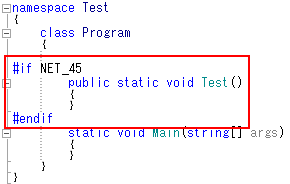
このNET_45というシンボルは、ちゃんとVisualStudioで使える。


今度はターゲットフレームワークをNet4.0にすると、シンボル名もNET_40になる。

当然、NET_45シンボルは無いので、#if で括った部分は無効になる。

2014.06.18追記
csprojで使えるメソッドとかの説明
http://msdn.microsoft.com/ja-jp/library/dd633440.aspx

2014年2月15日土曜日

Visual Studio Expressで、StyleCopを使う [改良版]

前回の方法だと、毎回StyleCopが走ってうざい。
とくに、実装中やデバッグ中のコードスタイルを指摘されるとキレそうになる。
だいいち、ワーニングとか見づらいし。

なので、Releaseビルド時のみチェックを走らせるようにした。

<Import Condition="Exists('$(ProgramFiles)\MSBuild\StyleCop\v4.7\StyleCop.targets') and '$(Configuration)' != 'Debug'"
        Project="$(ProgramFiles)\MSBuild\StyleCop\v4.7\StyleCop.targets" />

これで、デバッグ中はスッキリするようになった。

2014年2月11日火曜日

Extended WPF Toolkit 無料版 (Community Edition)

どんなコントロールがあるのか φ(..)メモメモ
例によってグーグル先生に聞いてみた。括弧内はWindows.Formsのコントロールに対応

  • AvalonDock (要はIDEみたいなドッキングウィンドウ)
  • AutoSelectTextBox (要はフォーカス時に選択状態になるTextBox)
  • BusyIndicator (要はProgressBar)
  • ButtonSpinner (要はNumericUpDown)
  • Calculator (要は電卓)
  • CalculatorUpDown (要は電卓とNumericUpDownの合体)
  • CheckComboBox (要は複数選択可能なComboBox+CheckListBox)
  • CheckListBox (要はCheckListBoxそのもの)
  • ChildWindow (要は中身を自由に作れるMessageBox)
  • CollectionEditor (要はPropertyGridのコレクションエディタ)
  • DataGrid (要は高速DataGrid)
  • CollectionControlDialog (要はPropertyGridのコレクションエディタのダイアログ版)
  • ColorCanvas (要はペイントツール等の色をつくる画面)
  • ColorPicker (要はColorDialogの中身の高機能版)
  • DateTimePicker (要はDateTimePickerのカレンダーが出た状態)
  • DateTimeUpDown (要はUpDownで日付時刻が変更できるDateTimePicker)
  • DecimalUpDown (要はDecimal?対応NumericUpDown)
  • DoubleUpDown (要はDouble?対応NumericUpDown)
  • DropDownButton (要はPanelのドロップダウンなボタン)
  • IntegerUpDown (要はInt?対応NumericUpDown)
  • Magnifier (要はルーペ機能)
  • MaskedTextBox (要はMaskedTextBox)
  • MessageBox (要はMessageBox)
  • MultiLineTextEditor (要はドロップダウンなTextBoxのMultiLineをTrue)
  • Pie (要は円弧のシェイプ)
  • PrimitiveTypeCollectionEditor (要はドロップダウンなコレクションエディタ??)
  • PropertyGrid (要はPropertyGrid)
  • RichTextBox (要はRichTextBox)
  • RichTextBoxFormatBar (要はRichTextBoxのツールバー:フォントや右寄せ)
  • SplitButton (ドロップダウンでパネルを表示するベースクラス??)
  • SwitchPanel
  • RandomPanel
  • WrapPanel
  • TimelinePanel (要は日付時刻に添ってレイアウトするパネル)
  • TimePicker (要はDateTimeUpDown の時間専用版)
  • WatermarkTextBox (要は入力して欲しい内容を薄く表示するTextBox)
  • WindowContainer (要は何だろ?)
  • Wizard (要はWizardを単一フォームで実現)
  • Zoombox (要は)

2014年2月5日水曜日

Visual Studio Expressで、StyleCopを使う

ソリューションエクスプローラで、プロジェクトをアンロードすると、右クリックメニューでプロジェクトファイルを編集できる。

<Import Project="$(MSBuildToolsPath)\Microsoft.CSharp.targets" />
<Import Condition="Exists('$(ProgramFiles)\MSBuild\StyleCop\v4.7\StyleCop.targets')" 
Project="$(ProgramFiles)\MSBuild\StyleCop\v4.7\StyleCop.targets" />
<!-- To modify your build process, add your task inside one of the targets below and uncomment it. 
Other similar extension points exist, see Microsoft.Common.targets.
<Target Name="BeforeBuild">
</Target>
<Target Name="AfterBuild">
</Target>
-->
</Project>

こんなんを用意して、スニペットに登録すると楽だよ
<?xml version="1.0" encoding="utf-8"?>
<CodeSnippet Format="1.0.0" xmlns="http://schemas.microsoft.com/VisualStudio/2005/CodeSnippet">
<Header>
<Title>ExpressでStyleCop</Title>
<Author>Jun</Author>
<Description>Ver4.7系に限定!あらかじめStyleCopのインスコが必要です。</Description>
<SnippetTypes>
<SnippetType>SurroundsWith</SnippetType>
<SnippetType>Expansion</SnippetType>
</SnippetTypes>
</Header>
<Snippet>
<Code Language="XML">
<![CDATA[<Import Condition="Exists('$$(ProgramFiles)\MSBuild\StyleCop\v4.7\StyleCop.targets')" 
Project="$$(ProgramFiles)\MSBuild\StyleCop\v4.7\StyleCop.targets"/>
]]>
</Code>
</Snippet>
</CodeSnippet>

2014年1月26日日曜日

PostSharp Expressは使えるか2

お試しビルドしようと思ったら、アクチ方法がわからない
と思ったら、visual studio expressでは、使えなかった(ノω・、)・・・

Is it possible to use PostSharp 3 with Visual Studio Express?

早くProfessional Editionに戻りたいよぉ

2014年1月25日土曜日

PostSharp Expressは使えるか1

とりあえず機能一覧を並べてみた。例によってgoogle先生の翻訳だが。
(http://www.postsharp.net/purchase)

ライセンスは、商用利用可能、再配布可能、仕様期限なし、なので問題ない。

E: Express (Free) 使える機能を青文字にした
P: Professional (€329)
U: Ultimate (€589)

CORE ASPECT FRAMEWOR
  1. (E/P/U) Exception Handling
    Catch exceptions before they get passed to the client code with OnExceptionAspect.
    これらはOnExceptionAspectとクライアントコードに渡される前に、例外をキャッチ。
  2. (E/P/U) Method Interception
    Intercept method executions and execute your own logic.
    インターセプト法の実行と独自のロジックを実行します。
  3. (E/P/U) Method Decorator
    Add instructions before and after method execution.
    メソッドの実行前と後の命令を追加します。
  4. (E/P/U) Property & Field Interception
    Automate code execution when a field or a property is get or set.
    フィールドまたはプロパティを取得または設定されている場合は、コードの実行を自動化する。
  5. (E/P/U) Build-Time Validation
    Ensure that your aspect is being used where expected.
    予想される所で、あなたのアスペクトが使われていることを確認してください。
  6. (E/P/U) Attribute Multicasting
    Apply aspects to large codebases declaratively using custom attributes.
    宣言的にカスタム属性を使用して大規模なコードベースにアスペクトを適用します。
ADVANCED ASPECT FRAMEWORK
  1. (P/U) Support for Async and Iterator Methods
    Add aspects to async methods and automatic iterators. Intercept OnYield and OnResume semantics.
    非同期メソッドおよび自動イテレータにアスペクトを追加します。 OnYieldとOnResumeセマンティクスを傍受。
  2. (P/U) Aspect Inheritance
    Add aspects to a class/interface or abstract/virtual/interface method, and have the aspect automatically applied to implementations.
    クラス/インタフェースまたは抽象/仮想/インターフェイスメソッドにアスペクトを追加し、アスペクトは、自動的な実装に適用されている
  3. (P/U) Event Interception
    Override Add, Remove and Raise methods in events with the EventInterceptionAspect.
    取り外し、EventInterceptionAspectでイベントのメソッドを上げ、追加オーバーライドします。
  4. (P/U) Composite Aspects
    Develop aspects composed of several primitive transformations and use advanced concepts such as pointcuts and advices.
    いくつかの原始的な変換で構成されるアスペクトを開発し、このようなポイントカットやアドバイスなどの高度な概念を使用しています。
  5. (P/U) Dynamic Aspect Providers
    Add aspects to large codebases programmatically using LINQ and System.Reflection.
    プログラムでLINQとするSystem.Reflectionを使用して大規模なコードベースにアスペクトを追加します。
  6. (P/U) Aspect Optimizer
    Have PostSharp analyze your aspects and just generate instructions that are necessary to support the features the aspects actually use.
    PostSharpはあなたのアスペクトを分析し、アスペクトは、実際に使用する機能をサポートするために必要な命令を生成している。
DIAGNOSTICS PATTERN LIBRARY (€74)
  1. (E/P/U) Detailed Tracing
    Add logging to your codebase and keep it in sync, automatically, with support for NLog, Log4Net, and Enterprise Library. (E:50 methods per project)
    あなたのコードベースへのロギングを追加し、NLOG、log4netの、およびエンタープライズライブラリのサポートにより、自動で同期に保管してください。
MODEL PATTERN LIBRARY (€109)
  1. (E/P/U) INotifyPropertyChanged
    Implement the right property change notifications at the right time, automatically.
    自動的に、適切なタイミングで適切なプロパティ変更通知を実装します。
    (E:10 classes per project)
  2. (U) Code Contracts
    Add precondition checking to your codebase using custom attributes.
    カスタム属性を使用して、コードベースにチェックする前提条件を追加します。
THREADING PATTERN LIBRARY (€109)
  1. (U) Thread Dispatching
    Simplify dispatching execution back and forth between background and foreground threads.
    前後に、背景と前景のスレッド間の実行をディスパッチ簡素化します。
  2. (U) Exclusive Threading Model
    Prohibit multiple threads from concurrently accessing an object. Throws an exception instead of allowing data corruption.
    同時にオブジェクトにアクセスする複数のスレッドを禁止。代わりに、データの破損を許可するので例外をスローします。
  3. (U) Reader/Writer Synchronized Threading Model
    Safely share objects between several threads and declare lock level semantically, using custom attributes.
    安全に複数のスレッド間でオブジェクトを共有し、カスタム属性を使用して、意味的にロック·レベルを宣言します。
  4. (U) Actor Threading Model
    Use Erlang-like actor-based multithreading in C# 5.0.
    C#5.0にErlangのようなアクターベースのマルチスレッドを使用しています。
  5. (U) Deadlock Detection
    Simplify the diagnosis of deadlocks in your project and never allow your application to freeze without an error message.
    プロジェクト内のデッドロックの診断を簡素化し、アプリケーションがエラーメッセージなしで凍結することができませんでした。
ARCHITECTURE FRAMEWORK
  1. (U) Extended Reflection API
    Get what System.Reflection does not give to you: programmatically browse used-using, parent-child, or member-type relationships at high speed using PostSharp's internal indexes.
    するSystem.Reflectionがあなたに何を与えていない情報:プログラム的に閲覧し使用 - 使用して、親子で、あるいは高速でのメンバー型の関係はPostSharpの内部インデックスを使用。
  2. (U) Syntax Tree Decompiler
    Decompile methods to Abstract Syntax Trees and perform finer analysis.
    抽象構文木にメソッドをコンパイルし、より細かい分析を行う。
  3. (U) Built-In Architecture Constraints
    Have a finer control over visibility of types and members.
    型とメンバの可視性をより細かく制御できます。
  4. (U) Custom Architecture Constraints
    Enforce your own design rules.
    独自の設計ルールを適用します。
PLATFORMS
  1. (E/P/U) .NET Framework
    Build applications targetting .NET Framework 2.0, 3.5, 4.0, or 4.5.
  2. (P/U) Silverlight
    Build applications targetting Silverlight 4.0 or 5.0.
  3. (P/U) Windows Phone
    Build applications targetting Windows Phone 7.5 or 8.0.
  4. (P/U) Windows Store
    Build applications targetting Windows Store 8 or 8.1.
  5. (P/U) Portable Class Libraries
    Build portable class libraries 4.0, 4.5 or 4.6.
VISUAL STUDIO INTEGRATION
  1. (P/U) Code Editor Enhancements
    Immediately see which aspects are applied to the code you're editing thanks to code adornments and enhanced tooltips.
    すぐに側面は、コードの装飾品や強化されたツールチップのおかげで、編集しているコードに適用されているかを確認。
  2. (P/U) Aspect Browser
    See all aspects present in your solution and which declarations have been affected.
    あなたのソリューションとその宣言が影響を受けている中に存在するすべての側面を見る。
  3. (P/U) File and Line Number of Error Messages
    Simply double-click on an error message to get to the relevant line of source code.
    単純に、ソースコードの該当する行を取得するエラーメッセージをダブルクリックします。
LICENSING
  1. (E/P/U) Commercial Use
    Use PostSharp for development of production/commercial software.
    生産/商用ソフトウェアの開発のためPostSharpを使用してください。
  2. (E/P/U) Royalty-Free Redistribution of Runtimes
    Distribute PostSharp.dll and runtime libraries that need to run on end-user devices.
    PostSharp.dllとエンドユーザデバイス上で実行する必要がランタイムライブラリを配布します。
  3. (E/P/U) Perpetual License
    No time bomb. If you can use a specific version of PostSharp one day,
    you can use it every day.
    いいえ時限爆弾ません。あなたは1日PostSharpの特定のバージョンを使用できる場合は、 あなたは毎日それを使用することができます。
SUPPORT
  1. (P/U) 1 Year of Free Updates
    Get bug fixes and major releases during the duration of the subscription.
    サブスクリプション期間中のバグ修正とメジャーリリースを入手してください。
  2. (P/U) Premium Support
    Have your issues addressed with priority, use phone and desktop sharing (limited number of premium support cases available).
    あなたの問題は、優先使用の携帯電話やデスクトップの共有(利用可能なプレミアムサポートケースの数が限ら)で対処してきた。